MCP + Magento 2 & Adobe Commerce: Build an AI Assistant for Your Commerce Store

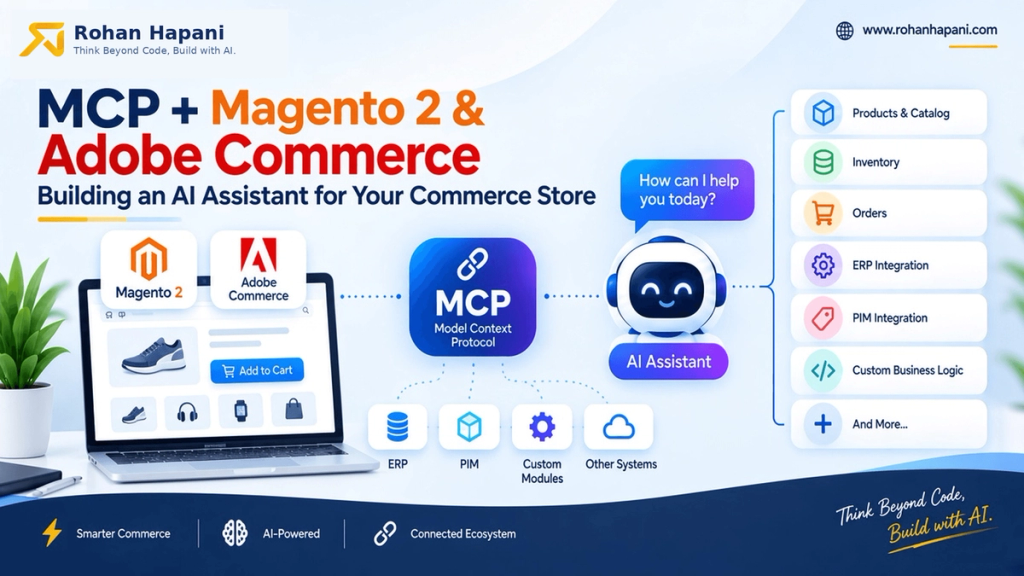
MCP with Magento 2 and Adobe Commerce is an exciting combination for developers looking to build AI-powered commerce applications.
Magento 2 and Adobe Commerce already provide powerful APIs and extensibility mechanisms, including REST and GraphQL. But an AI assistant doesn't naturally understand those APIs as AI tools. MCP provides a standardized layer through which an AI application can discover and invoke capabilities exposed by your Magento integration.
Imagine asking your AI assistant:
“Which products are out of stock in Jeddah?”
Or:
“Show me the latest orders placed today.”
Or:
“What is the current stock for SKU 100234?”
If your Magento 2 store is not connected to an AI system, the assistant does not have access to that information. You might need to open Magento Admin, search for the product or order, export the data, and then give that information to the AI manually.
That works for a quick question. But it becomes difficult when you want AI to work with live Magento data and perform useful store operations.
This is where the Model Context Protocol (MCP) comes in.
What is MCP?
MCP is an open protocol for connecting AI applications with external data, tools, and capabilities. Instead of building a completely different integration for every AI application, an MCP server provides a standardized interface that AI clients can use to discover and invoke capabilities exposed by your system.
In simple terms, MCP provides a standard way for AI applications to communicate with external tools and systems.
For Magento 2, this creates an interesting possibility: your AI assistant can interact with your commerce platform through purpose-built MCP tools.
How Does MCP Work with Magento 2 and Adobe Commerce?
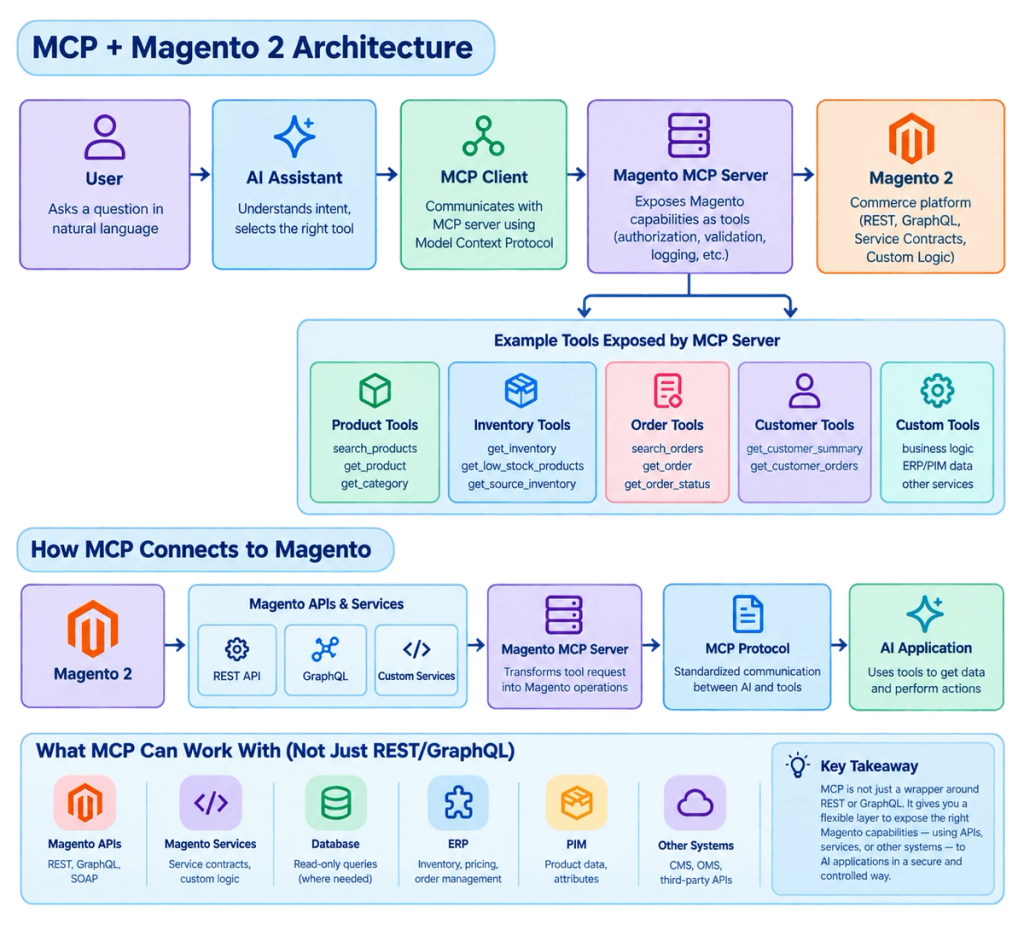
The MCP server acts as the middle layer. It knows how to communicate with Magento & Adobe Commerce. The AI only needs to know which tools are available.
Why is MCP interesting for Magento and Adobe Commerce?
MCP becomes interesting when we move beyond the idea of simply exposing Magento data to AI.
A Magento or Adobe Commerce store contains much more than products and orders. It has business rules, inventory logic, pricing, customers, promotions, CMS content, integrations, configuration, operational workflows, and custom modules.
An MCP server can turn these capabilities into tools that an AI assistant can understand and use.
For example, instead of asking an AI assistant to simply:
“Call the Magento product API for SKU 100234.”
you could give it higher-level capabilities such as:
- Product intelligence — Find products, compare products, explain product attributes.
- Inventory operations — Check stock by location, identify low-stock products, find available stores.
- Order operations — Find orders, summarize order information, investigate order issues.
- Pricing and promotions — Check active promotions, understand applicable discounts, investigate pricing differences.
- Customer support — Look up customer/order information and help support teams investigate issues.
- Catalog management — Identify missing attributes, incomplete product information, or catalog inconsistencies.
- CMS and content — Search content, review product content, or assist with content workflows.
- Business intelligence — Answer questions such as “Which products have low inventory in Jeddah?” or “What orders need attention today?”
- Operational workflows — Trigger approved business processes, notifications, synchronizations, or other actions.
- Custom Magento logic — Expose functionality from custom modules and business rules that may not exist as standard Magento APIs.
- ERP/PIM/CRM integrations — Combine information from Magento with other enterprise systems.
- Developer workflows — Help developers understand Commerce projects, documentation, storefront components, events, and implementation patterns.
Adobe's current Commerce MCP tooling itself demonstrates this broader direction: its MCP/agent tooling covers development workflows, storefront components, events, integrations, testing, and documentation.
You can review it Commerce development MCPs and skills
Some Useful Magento 2 and Adobe Commerce MCP Projects :
You may also like this blogs :
How to Set Up an MCP Server in Cursor
Cursor supports MCP servers through its Customize → MCPs interface or through an mcp.json configuration file.
Option 1: Add an MCP Server from Cursor
Follow these steps:
- Open Cursor.
- Go to Settings → Tools & MCPs.
- Under Installed MCP Servers, you can see the MCP servers already configured in Cursor.
- To add a new custom server, click New MCP Server → Add a Custom MCP Server.
- If the MCP server is available through the Cursor Marketplace, you can also install it using the Add to Cursor option.
- After adding the server, make sure its toggle is enabled.
- Expand the MCP server to check the tools, prompts, and resources it provides.
- Open Cursor Agent and ask a question that requires one of those tools.
For example:
"Check the inventory of SKU 100234."
Cursor can then use the appropriate MCP tool to perform the requested operation. Cursor requires approval before MCP tools are executed by default.
Option 2: Configure a Custom MCP Server with mcp.json
If you're building your own MCP server, you can configure it manually.
Step 1: Create the configuration file
For a project-specific MCP server, create:
.cursor/mcp.jsonFor a global MCP server, you can use:
~/.cursor/mcp.jsonCursor supports both project-level and global MCP configuration.
Step 2: Add your MCP server
For a local Node.js MCP server:
{
  "mcpServers": {
    "magento-mcp": {
      "command": "npx",
      "args": ["/path/to/magento-mcp/server.js"]
    }
  }
}
Cursor officially supports local command-based MCP servers using command, args, and optional environment variables. Here, You can check more details => Click Here
Step 3: Use environment variables for credentials
If your MCP server requires credentials, avoid putting secrets directly into the configuration.
For example:
{
  "mcpServers": {
    "magento-mcp": {
      "command": "npx",
      "args": ["/path/to/magento-mcp/server.js"],
      "env": {
        "MAGENTO_URL": "${env:MAGENTO_URL}",
        "MAGENTO_TOKEN": "${env:MAGENTO_TOKEN}"
      }
    }
  }
}
Cursor supports environment-variable interpolation in MCP configuration.
Step 4: Enable the server
After saving the configuration:
- Open Settings → Tools & MCPs.
- Find your MCP server.
- Make sure the toggle is enabled.
- Expand the server and verify that its tools are available.
Step 5: Test the MCP server
Open Cursor Agent and try a simple request:
Check the inventory of SKU 100234.If the MCP server exposes the required tools, Cursor can use them directly from Agent.
Secure Your MCP Integration Before Connect to Your Store
Connecting an MCP server to a commerce system is different from giving an AI access to a normal chat. The server may be able to perform real operations, so the MCP server and the systems behind it should enforce the same authorization and security controls you would expect from any other integration. MCP's current security guidance also emphasizes authorization, validation, user approval, and careful handling of sensitive data.
- Create a dedicated integration for Magento: For Adobe Commerce/Magento Open Source PaaS deployments, use a dedicated Commerce integration rather than sharing a personal Admin account. Commerce integrations can be given a specific set of API resources.
- Give it only the access it needs: If your MCP server only needs product and inventory information, don't give its underlying Magento integration access to unrelated customer, sales, or configuration resources. Magento's authorization model allows integration permissions to be restricted to selected resources.
- Keep credentials outside the conversation: Never put Magento passwords, access tokens, client secrets, or other credentials into an AI prompt. Store secrets in environment variables or a proper secret-management system and let the MCP server handle authentication.
- Separate read and write capabilities: Start with tools that retrieve information, such as
get_product()orcheck_inventory(). Treat operations such asupdate_inventory(),update_product(), orcancel_order()as higher-risk capabilities that deserve additional authorization and confirmation. - Keep development and production separate: Test your MCP server with a development or staging Magento environment first. Use separate credentials and permissions rather than connecting an experimental MCP implementation directly to your production store.
This gives your team an opportunity to understand exactly what the AI can access and what actions it can perform before connecting more sensitive commerce workflows.
Security tip: Start your MCP implementation with read-only tools, use a dedicated least-privileged integration, keep credentials outside the AI conversation, and require explicit approval for operations that modify store data.
Frequently Asked Questions
What is MCP in Magento 2?
MCP is a standardized protocol that can connect AI applications to selected Magento & Adobe Commerce capabilities through an MCP server. The server can expose tools that retrieve information or perform approved operations.
Can I use MCP with my existing Magento 2 custom modules?
Yes.
An MCP server can expose functionality from custom Magento modules as AI tools. This means you can take the business capabilities you've already built in your Commerce application and make them available to an AI assistant.
Can I use the same MCP server with Claude Code?
Yes.
MCP is designed as a standard protocol rather than something tied to a single AI application. Claude Code supports MCP servers and can connect to external tools and data sources through MCP. Anthropic's current documentation also supports adding an MCP server through project .mcp.json configuration or the claude mcp command.
Does MCP give the AI direct access to my Magento & Adobe Commerce database?
Not automatically.
An MCP server only has the capabilities that its implementation exposes. You decide whether a tool reads Magento & Adobe Commerce services, APIs, databases, ERP systems, or other sources.
For production systems, avoid exposing a generic unrestricted SQL tool. Prefer narrowly defined business tools with validation and authorization.
Can MCP connect Magento 2 with an ERP?
Yes. MCP can act as an AI-facing layer over Magento, ERP, PIM, CRM, and other commerce systems.
Instead of exposing every underlying integration detail to the AI, you can create business-focused MCP tools.
The MCP server can then orchestrate the required Magento and ERP operations and return a simple result to the AI assistant.
This makes MCP particularly interesting for Adobe Commerce stores with existing ERP integrations and custom business workflows
I hope this guide helped you understand how MCP works with Magento 2 and Adobe Commerce and how it can be used to build AI-powered commerce workflows. MCP can make Magento data, custom business logic, inventory, orders, ERP, PIM, and other commerce capabilities accessible to AI assistants through well-defined tools.
Keep liking and sharing !!!