
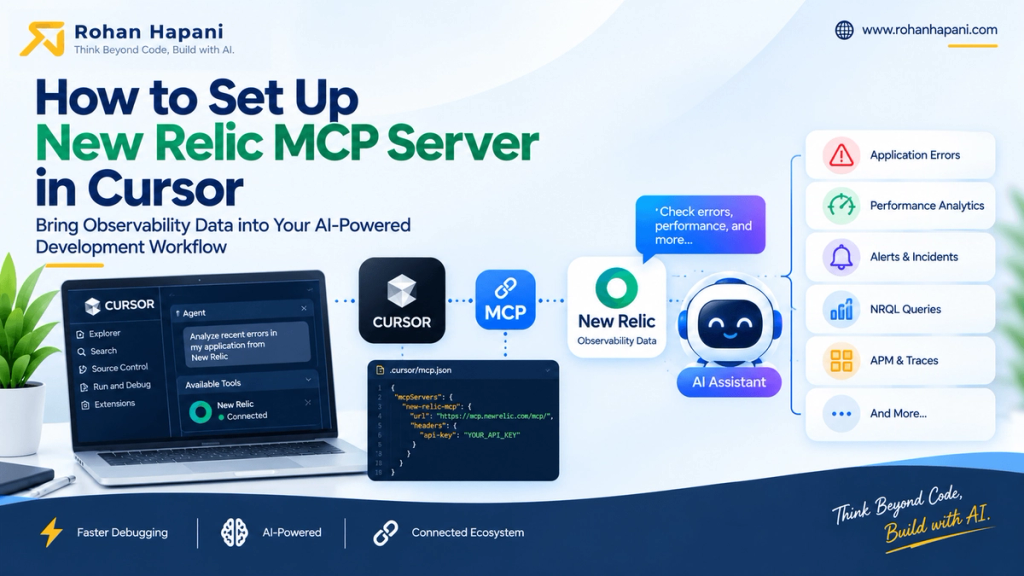
If you use Cursor for development and New Relic for observability, performance tracking, debugging purpose then, MCP gives Cursor a standard way to call external tools and data sources, while New Relic provides MCP tools for querying and analyzing observability data, track the performance record.
Important compatibility note: New Relic's current official MCP documentation lists Claude Code, Antigravity CLI, Codex, Kiro CLI, Claude Desktop, and VS Code as supported MCP clients. Cursor is not currently listed. Cursor does, however, officially support remote MCP servers over HTTP and OAuth. The setup below therefore uses the documented MCP capabilities of both products rather than claiming a vendor-documented Cursor integration.
You May Also Like This :
What is New Relic MCP?
MCP, or Model Context Protocol, is a standard that allows AI applications to connect to external tools and data sources.
New Relic provides an MCP server that exposes New Relic capabilities to supported AI clients. This allows an AI agent to work with observability information from your New Relic account using natural-language requests.
Cursor also supports MCP and can connect to remote MCP servers using HTTP. Cursor can discover available MCP tools and use them when they are relevant to your request.
Why use New Relic MCP with Cursor?
For developers, the main advantage is reducing the gap between production observability and source-code investigation.
New Relic says its MCP server can help engineers investigate issues, analyze error logs, check alert status, and query observability data using natural language. It can also convert natural-language questions into NRQL, New Relic's query language.
For example, instead of manually opening New Relic, you can ask:
"What are the top errors from the last hour?"
Or
"Show me recent alerts for my web application."
The AI can select the appropriate New Relic MCP tool and return the result in the development environment.
Prerequisites
Before starting, you need:
- A New Relic account with access to the data you want to query.
- A Cursor installation with MCP support.
- A New Relic user whose organization-level permissions allow access to the MCP server.
- MCP access enabled by your New Relic organization administrator.
- OAuth authentication for this setup.
Steps for Setup New Relic MCP in Cursor
Step 1: Create the Cursor MCP configuration
Cursor supports project-level MCP configuration through:
.cursor/mcp.jsonYou can also configure MCP globally using:
~/.cursor/mcp.jsonCursor documents both configuration locations.
For a project-specific configuration, create:
.cursor/mcp.jsonStep 2: Add the New Relic MCP server
Add the New Relic server under mcpServers.
For the API-key configuration, use:
{
  "mcpServers": {
    "new-relic-mcp": {
      "url": "https://mcp.newrelic.com/mcp/",
      "headers": {
        "api-key": "YOUR_NEW_RELIC_API_KEY"
      }
    }
  }
}
The url points to New Relic's MCP endpoint. Cursor officially supports remote MCP servers with a url and custom HTTP headers.
Replace:
YOUR_NEW_RELIC_API_KEYwith your actual New Relic API key.
Step 3: Restart or reload Cursor
After saving the MCP configuration, restart Cursor or reload the MCP configuration.
Cursor automatically discovers configured MCP servers and exposes their tools to Agent when available.
Step 5: Verify the connection
Open Cursor's Agent/Chat interface and check the available MCP tools.
Cursor documents that MCP tools appear in the tools list and that Agent can use them when relevant. By default, Cursor asks for approval before using an MCP tool.
You can then send a simple prompt such as:
"What New Relic data can you access?"
If the connection is working, Cursor should be able to discover and use the available New Relic MCP tools.
If you need to troubleshoot the connection, Cursor provides MCP logs through the Output panel.
Where to get the New Relic API key
- Login to New Relic
- Click on your Profile (Top Right side)
- Inside Management Section, Click on API Keys option.
- If you haven’t generate key, then click on Create a Key and then, generate a key for that.
- After successfully created a API Key, you will get key something like NRAK-XXXYYYZZZ. Copy that key and paste into your mcp json.
Important: New Relic's current MCP documentation recommends OAuth for its supported MCP clients and notes that API-key setup may not work for all documented MCP functionality. The API-key configuration shown above is specifically the Cursor configuration using Cursor's documented HTTP-header authentication capability.
After the connection is working, try these prompts in Cursor:
- "What are the top errors from the last hour?"
- "Show me recent alerts for my web application."
- "Run an NRQL query to analyze performance."
These examples are based on queries shown in New Relic's official MCP tool reference. You do not need to know the underlying MCP tool names; the AI agent can select the appropriate tool based on your request.
Frequently Asked Questions
What is New Relic MCP?
New Relic MCP is an MCP server that exposes New Relic capabilities to AI clients through the Model Context Protocol.
Can I use New Relic MCP with Cursor?
Cursor supports remote HTTP MCP servers and authentication headers. New Relic provides the MCP endpoint, while its current documentation does not list Cursor as a named supported MCP client.
Is New Relic MCP useful for Magento 2 Adobe Commerce developers?
Yes. It can be useful for bringing application observability information into an AI-assisted development workflow when investigating performance problems, errors, alerts, and incidents.
Should I store my New Relic API key in mcp.json?
It is better to use Cursor's environment-variable interpolation so that the secret does not need to be stored directly in the configuration file.
Conclusion
New Relic MCP gives AI agents a standard way to work with New Relic observability data, while Cursor provides MCP support directly inside the development workflow. Although New Relic's current documentation does not list Cursor as an officially supported client, Cursor's documented remote HTTP and OAuth MCP support makes this configuration possible using the vendors' documented MCP capabilities.
For production use, keep authentication least-privileged and verify your organization's New Relic MCP permissions before connecting production observability data to an AI development environment.
I hope this guide helped you understand how to connect the New Relic MCP server with Cursor and use observability data while developing and debugging Adobe Commerce and Magento 2 applications.
MCP can help bring production errors, performance data, and application insights closer to your development workflow, making troubleshooting faster and easier.
Keep learning, liking, and sharing! 🚀